 ZyroByte Tech Blog
 ZyroByte Tech Blog
A practical breakdown of the modern app development process.
A lot of people have app ideas, but only a small number understand how to build an app properly. Building an app isn’t one task, but it’s a series of decisions, designs, and technical steps that all depend on each other. Once you see the full roadmap, the whole process becomes much easier to handle.
This guide breaks the process into five main stages. It is the same way we think about projects at ZyroByte when we help founders and companies turn ideas into real products.
If you already have an idea and want help turning it into a proper build, you can start your project here:
Start-your-project
Step 1: How to Shape Your App Idea
Every app begins with a problem worth solving
Before a single line of code or a design decision, you need a clear understanding of what the product is, who it serves, and why it should exist.
Identify the problem you are solving
Start by writing down the problem in plain language.
- Is this app saving people time?
- Is it making a boring task easier?
- Is it helping someone earn or save money?
If you cannot explain the problem in one or two clean sentences, the idea is still blurry. A clear problem statement anchors every decision that comes later.
Define your target users
Next, think about who you are building for.
- Freelancers
- Parents
- Drivers
- Small shop owners
- Students
Be specific. “Everyone” is not a target audience. A budgeting app for freelancers feels very different from a budgeting app for teenagers.
Write simple user stories
User stories help you translate the idea into actions.
- A freelancer wants to log an expense in a few taps.
- A parent wants to reorder groceries without building a new list every time.
- A driver wants the fastest route, not the shortest one.
You do not need a big template or rules. A single sentence that starts with “A user wants…” is enough at this stage.
Map the basic app flow
Now sketch sketch the major flow of the app:
- User lands on a welcome screen
- They sign up or log in
- They land on a home dashboard
- They move into core features
- Settings and profile live somewhere easy to access
This rough flow lets you see if anything is missing. It also keeps you from jumping straight into features without a structure.
Sketch initial screens on paper
Finally, draw the individual screens quickly:
- Boxes for headers
- Rough shapes for buttons
- Areas for lists and forms
Do it quickly. You are not worried about colors or fonts yet. At ZyroByte, we always start here because it is the cheapest place to make mistakes. A few minutes with a pen can save days of redesign later.
We see this all the time. A founder once came to us with a rough idea for a delivery app. After we shaped the idea, it became a focused tool for part time drivers who needed better earnings tracking and route summaries. That small shift in clarity completely changed the direction of the product.
Quick checklist before you move on:
- One sentence problem statement
- Three simple user stories
- A basic flow on paper
- A clear target user
Step 2: Designing Your App
UX, Wireframes, and UI Explained
Once the idea feels clear and the flow makes sense, you can move into design. At this point the app begins to feel real instead of theoretical.
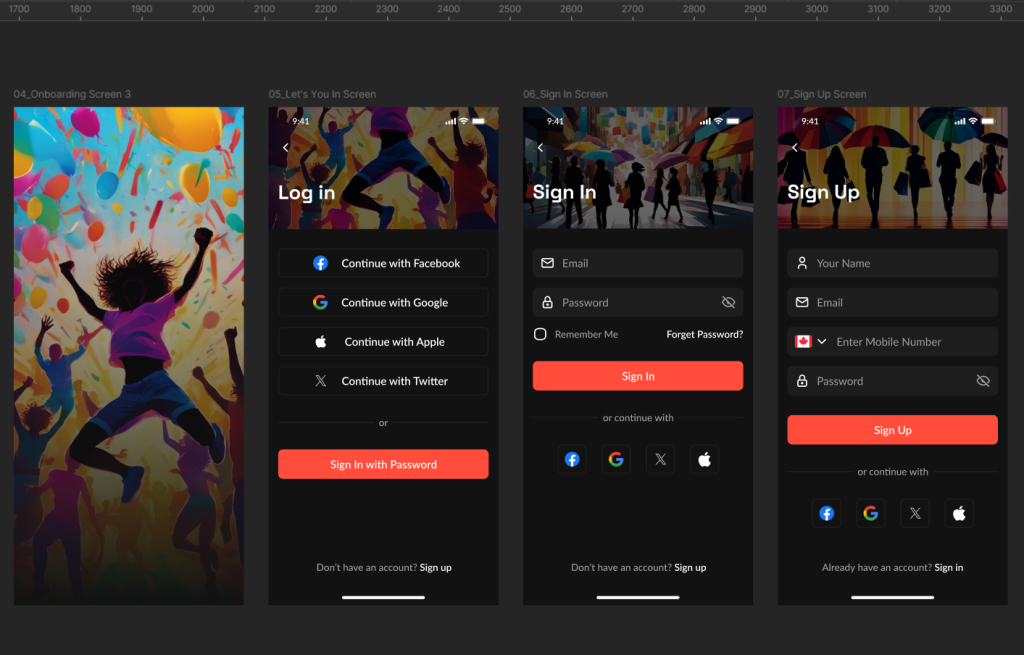
Turn sketches into clean wireframes
Wireframes are a cleaner version of your sketches.
- You strip away any decoration and focus only on layout and structure.
- Where does the navigation sit?
- How does a user move from one screen to the next?
- Where do key actions live on the screen?
You can use tools like Figma or Whimsical, but the mindset is the same. You are designing the skeleton, not the skin.
Plan user navigation and screen logic
Look closely at how a user gets from point A to point B.
- Is it obvious where to tap next?
- Do people have to go back too often?
- Are you hiding important actions in menus?
Good navigation feels simple even when the app is doing a lot. This is a good moment to remove anything that feels like extra friction.
Create the UI in Figma
Once the layout works, you start adding visual style.
Pick a color palette that fits your product. A calm tool uses softer tones. A bold consumer app might lean brighter. Choose typography that is readable on small screens. Define how cards, buttons, and inputs look.
This is where ZyroByte builds out full component sets so every part of the interface feels like it belongs to the same product.
Build a simple design system
You do not need a massive system to start. Even a small one helps:
- Primary and secondary button styles.
- Text styles for headings, body, and captions.
- Standard spacing rules.
- A handful of reusable components.
A design system keeps everything consistent and makes it easier for developers to implement the design.
Prototype interactions
Turn your static screens into a clickable prototype.
- Tap through sign up.
- Move into the main feature.
- Trigger a few flows like search, add, edit, and save.
It is easier to see awkward steps when you experience them instead of just looking at them. Founders often spot important changes at this stage.
Step 3: Building the Core of Your App
Frontend, Backend, and Database
Now you move into engineering. Now the design you’ve been shaping finally becomes a working product.
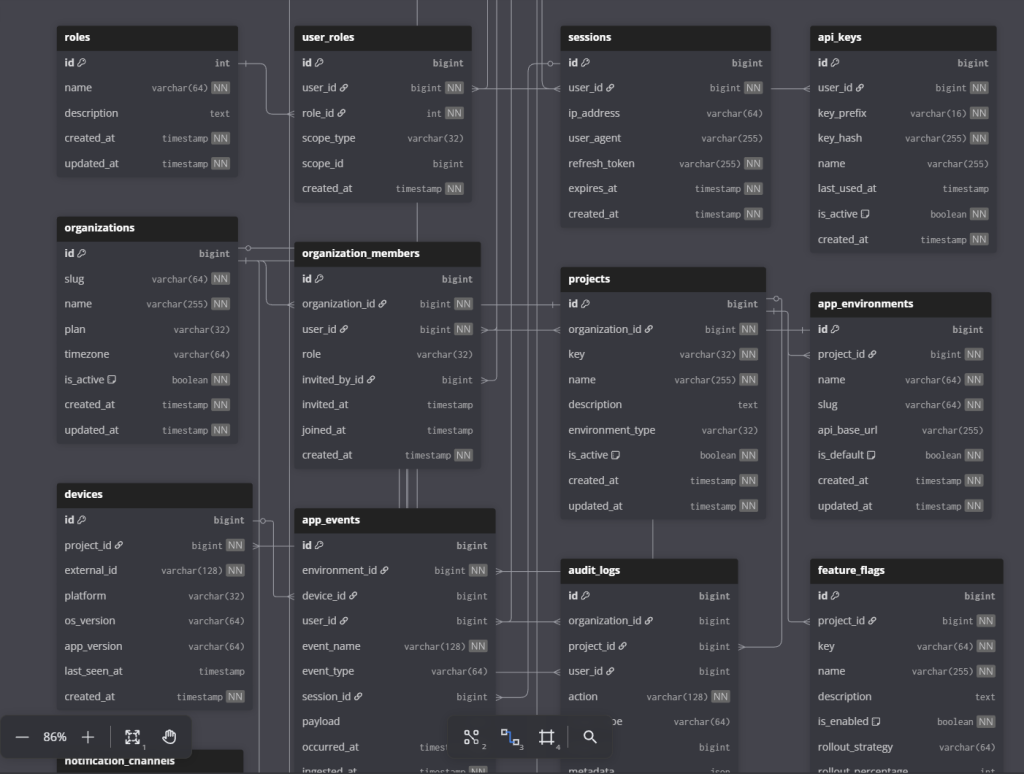
Choosing the tech stack
Pick the tools based on your goals, not hype.
- React Native or Flutter if you want one codebase for iOS and Android.
- Swift and Kotlin if you want fully native apps.
- React or Next for web if you plan a browser version.
For the backend, Go, Node, or Python all work well in different scenarios. Databases like PostgreSQL handle most structured data needs with room to grow.
At ZyroByte, we choose stacks by looking at long term plans, performance needs, and the team’s ability to maintain the system.
Frontend development
Frontend developers take the Figma design and turn it into real screens.
- They implement the layout, navigation, forms, animations, and various states.
- The app needs to feel responsive and stable.
- Layouts must adapt to different screen sizes.
Details like loading states and error messages matter more than people think. They are the difference between an app that feels polished and one that feels rushed.
Backend development
The backend is where business logic lives.
- Account creation and login.
- Permissions and roles.
- Processing payments.
- Sending notifications.
- Handling complex workflows.
We build backends to be modular so features can be added without breaking everything else. A strong backend keeps the app reliable as you grow.
Database architecture
A good database does not call attention to itself. It just works.
- Plan your tables and relationships in an ERD.
- Normalize the data to avoid duplicates.
- Add indexes to keep queries fast.
PostgreSQL is usually a safe choice for most moder n products. It handles growth well and has strong support for complex queries.
Integrating APIs and key features
Modern apps rarely live in isolation. They talk to payment providers, messaging tools, analytics platforms, and more.
Each integration needs to be planned and tested. Handle failures gracefully so a hiccup in one service does not break the whole app.
At this point, your core product is in place and you can use it end to end.
Step 4: Preparing Your App for Real Users
Infrastructure, Testing, and Performance
Before you open the doors, you need to make sure the app behaves well in the real world.
Infrastructure setup
Set up your servers or managed cloud environment.
Configure hosting, domains, SSL, and basic scaling. Use containerization so development, staging, and production behave the same.
In practice, this is when we put in the foundational setup that keeps the app stable once real users arrive.
CI and CD for reliable updates
Continuous integration and continuous delivery are simply ways to make updates safer.
- Code changes are tested automatically.
- Deployments follow a predictable path.
- Rollbacks are possible if something goes wrong.
You do not want to be manually copying files to servers every time you update the app.
Caching and performance improvements
People leave slow apps. You only get a few seconds before they close the screen.
- Use Redis for frequently accessed data.
- Serve images and static content through a CDN.
- Cache heavy API responses when it makes sense.
Small gains add up. Even shaving off one second from key flows can improve user retention.
Testing the app across devices
Testing is more than checking if the app runs.
- Try different phones and tablets.
- Switch between orientations.
- Use slow networks.
- Trigger errors on purpose.
You want to know how the app behaves under less than ideal conditions. Automated tests and manual QA both have a role here.
Security checks and monitoring tools
Security is not something you bolt on at the end. Still, this is the right time to step back and look at it as a whole.
- Check for common vulnerabilities.
- Review authentication and authorization.
- Confirm data is encrypted where it needs to be.
Add monitoring so you can see errors, slow queries, and unusual behavior in real time. This gives you awareness once users come in.
Step 5: How to Launch Your App and Scale It Over Time
App Stores Marketing, Early-Stage Scaling
After all of that, you are ready to go live. Launch is the start of the next phase, not the end of the journey.
Deployment and app store submission
Prepare your production environment and push the build.
Submit to the App Store and Google Play with clear descriptions and strong visuals. Make sure your listing actually explains why someone should download the app.
On the web side, set up your main domain, redirects, and security settings.
Launch day setup and monitoring
On launch day, keep a close eye on everything.
- Watch logs and monitoring dashboards.
- Look for error spikes.
- Listen to early feedback.
You want to catch issues quickly, while the audience is still small enough that you can fix things quietly.
App Store Optimization and marketing
Even the best product needs visibility.
- Use relevant keywords in your store listings.
- Share short videos and screenshots that show the main value clearly.
- Talk about the app on platforms where your audience already spends time.
This does not have to be a huge campaign. Focus on honest, clear communication that matches the problem you set out to solve.
Collecting user feedback and improving the app
Real usage will always reveal things you did not expect.
- Watch how people actually use the app.
- Look at analytics, not just opinions.
- Listen, then prioritize changes based on impact.
Updates do not need to be huge. A series of small, thoughtful improvements often beats one big release.
Scaling features and infrastructure over time
As your user base grows, the system has to keep up.
- Optimize database queries.
- Increase capacity where needed.
- Refine parts of the architecture that start to feel tight.
ZyroByte often stays involved at this stage, helping teams grow the product without losing the stability they had at the beginning.
What it Costs to Build an App
App costs vary widely based on complexity, features, platforms, integrations, and long term goals. No two projects share the exact same blueprint.
Most founders start with a rough range in mind, but the real estimate comes from understanding the problem, the features, and the scale of the product.
Instead of locking numbers here, the smartest approach is to talk through:
- What the core version of your idea looks like?
- Which features belong in the first release?
- What can be added later?
- What level of performance and scale you need from day one?
If you want a realistic estimate tailored to your idea, you can start your project here:
Start-your-project
Why Work with ZyroByte
Building an app is no longer just about writing code. You are dealing with design, user experience, backend architecture, databases, infrastructure, testing, and growth. When those parts are scattered across different freelancers, the gaps show up later.
ZyroByte brings everything together as one team. Designers, developers, system architects, and testers work on the same plan. That leads to cleaner builds, smoother launches, and products that are ready for real users instead of just demos.
Ready to Build Your App
If you have an idea and want to approach it properly, you do not have to guess your way through the process. There is a clear path from idea to launch, and the right team can walk it with you.
You can start your project here:
Start-your-project
Your app does not need to stay in your head or in a notebook. You can turn it into something real. Every app starts as a simple idea. Most people never take the first step. If you’ve made it this far, you’re already ahead of most. The rest becomes easier once you start.